Search

Librarian Design Share

inspiration for library creatives

Author

Veronica Arellano Douglas

Instruction Coordinator at the University of Houston Libraries

In Need of Library Display Inspiration

After reviewing our past posts, April and I realized that Librarian Design Share is seriously lacking in the book/library resource display category. As medical and academic librarians, we don’t often get the chance to create fun, interesting displays for our students and faculty, but we know that so many of you do!

Want to share your latest book display? Here’s your chance! Email us photos of your latest and greatest work, and we’ll feature your amazing display here on Librarian Design Share. We’re looking forward to seeing what you’ve designed!

Look and Feel Constraints

As librarians we’re often designing websites, handouts, and publicity materials that have to conform to certain institutional design standards. Whether you’re in a library that requires its logo on every brochure or at a university with very specific font and color branding, you’ve no doubt felt the constraints that an established look and feel can have on your design creation. Here are the boundaries we work within:

Veronica

The college I work for is in the midst of a branding evaluation, meaning that at some point in the next few years we’ll likely have a revised logo, colors, and font that will be standard on all of our print and web publications. For the time being, here’s what we use:
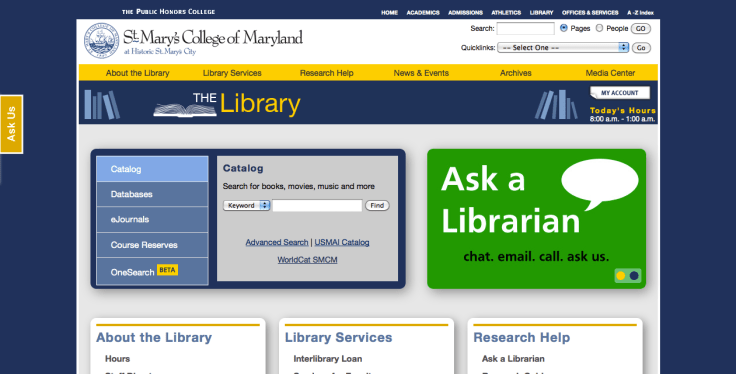
homepage-screenshot

  • A fixed-width web template
  • Variations of gold and two types of blue to match our college colors
  • A very intricate logo
  • A standard header that takes up a good portion of the screen

Our web team is working hard to prepare for the changes that this branding evaluation will likely bring to the college’s virtual presence. Like me, the web developers hope that our new university template will be responsive, rather than fixed width, and that the college header will be much smaller. My hope is that we modify or eliminate the standard logo in favor of a simplified text-based brand. I understand the need for color constraints, so I’ve tried my best to work within the colors of the college.

To make up for the space taken by the college header, I’ve tried to keep the library header small, although I’m planning to revise it to take advantage of some of the wasted space in the middle and make the header menu more visible. I’ve also tried to make the search area and announcement slider the main focus of the page. I’m not sure how successful I’ve been, but it’s a start.

How do you work within web template constraints?

April

I work at a large university hospital with a specific department that concentrates on maintaining our brand so that it is not diluted or misconstrued among our thousands of employees and our international audience. Our brand standards call for a certain set of colors and fonts that should be adhered to when creating designs, even those that are used in-house.  Complying with these standards (see below) has been my biggest challenge when designing publications.

3-26-2013 1-40-10 PM

One of my first charges as a new hire was to redesign our General Info page (that you’ve seen here).  My first draft looked pretty similar in design to what you’ve seen, but the colors were my favorite lime green, grey, and orange, the fonts didn’t conform, and I neglected to add the institutional logo.  My supervisor quickly showed me the brand standards on our intranet, and I modified my design to incorporate theirs by carefully replicating the CMYK numbers and adding in other elements.

It’s not always easy, as I find the standards limit my creativity at times, but because I now understand and respect the reasoning behind the standards, I’m trying to follow them more closely in everything that I create.

Design Aids: Sources for Great CC Images

So many of the designs I create have a great Creative Commons licensed photo at their core. These are my favorite sources for CC licensed images:

Flicker Logo
Flickr’s Advanced Search gives you the option to only search for CC-licensed content on Flickr and limit that subsection of to only content that can be modified, adapted, or built-upon. This is my go-to for great photographs. The Flickr Commons is also a great source of archival photos with no known copyright restrictions. I haven’t had much of an opportunity to use it yet, but it’s nice to know that it’s available!

morgueFile

morgueFile is a total Librarian Design Share inspiration. Artists contribute images and photographs to the site which can be downloaded and remixed (with credit to the creator) by other artists. There’s also the morgueFile portfolio section, which includes some copyrighted photos, but also lots of cc-licensed work.

fotopedia

Fotopedia has some truly spectacular photos. They’re not all CC-licensed, but quite a few are available to download, reuse, and remix.

What are your favorite sources for images?

Visualizing Collections

afro-am-imprints

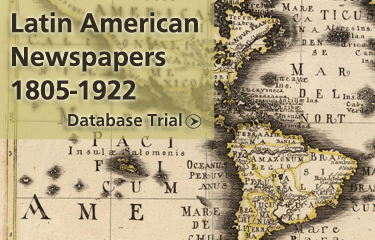
We’re nearing the end of the fiscal year at my library, which means we’re in a mad dash to spend our acquisitions budget. As a result we have a number of different databases on trial at the moment. Each of these slides appears on our library’s website and are meant to draw people in to the database content.

It’s a tricky thing to do. Databases are not often considered “sexy” and unless they’re archival collections with interesting images like the Afro-Americana Imprints, it can be difficult to draw users in to check them out.

latin-american-newspapers

I created each slide in hopes that they would catch the eyes of our students and faculty and introduce them to a new resource. I’ll let you know if they work!

For the original Photoshop files, email Veronica Arellano Douglas.

LibQual Infographic: Data reimagined

LibQual PosterSo much of the information that we gather about our libraries needs to be shared with our users, but just how do we share it? Meggan Frost, Public Services Librarian at Paul Smith’s College, has given us a great example of  visually representing data gathered through the formal library assessment LibQual.

Here’s Meggan in her own words:

I created this conference-sized poster (4’x3’) to publicize the findings of our LibQUAL survey. We had incredibly high participation in the survey, and we wanted to make sure that our community understood that we took their responses seriously. I created this poster using InDesign. Initially, I had a hard time conceptualizing how I wanted to present the information. Because the poster is conference-sized, I found it hard to break out of “conference poster” design mode in the beginning. Once I realized that I actually wanted to design something more like an infographic, I was able to quickly sketch out a design that turned into the one you see here. This poster was prominently displayed at the front of the library this fall.

This infographic is much more powerful than the plots, charts, and text that typically makes up a library’s LibQual report, and turning it into a poster to share with her campus community further bolster’s her library’s user-focused attitude.

For the inDesign file of this poster, email Meggan Frost.

Revamp Your Handouts

We’ve all done it. At some point in our librarian careers, we’ve all created The Handout. It’s swimming in text, full of links and lists of resources or background information. Maybe we were really busy that day and just needed to get something printed out quickly. Maybe we couldn’t think of a good way to make our handout look good. Maybe we just needed a little inspiration.

Informational pieces don’t need to be boring. Here’s a bit of inspiration from  Tony Bandy, consultant from Library Knowledge:
Let's Code! An information handout from Tony Bandy

[This is a handout from a] library training session that I put together using Apple’s Pages product and associated template. However, there’s some modifications that I was able to do, in particular combining some of the stock Microsoft photographs as well as some screenshots from the Google Android developers platform. I also tweaked the colors a bit to enhance and complement the stock photography, combining the thought that this is interesting information, but at the same time something to be seriously planned through.

For the original Pages files, email Tony Bandy.

Kindle Inspiration

Kindle is hereThis submission is a great example of what we hoped Librarian Design Share could do. Here’s what Bohyun Kim from Florida International University Medical Library has to say about her new Kindle lending program advertisement:

This is a poster I created [using Photoshop] for my library’s new Kindle e-book reader lending program sponsored by the National Network of Libraries of Medicine/Southeast Atlantic Region Express Mobile Technology Project Award. The poster will be printed on a large glossy paper (36′ x 24′). This poster design has been inspired by the circulation desk signage of Saint Mary’s College of Maryland Library featured on Library Design Share back in December.

You can read more about Bohyun’s poster creation on the ACRL Tech Connect blog (which, if you’re not reading, you should definitely checkout!). If you’ve been inspired by any of our posts, we’d love to feature your adaptations.

For the Photoshop file of this poster, email Bohyun Kim.

New Designs For an Image Carousel

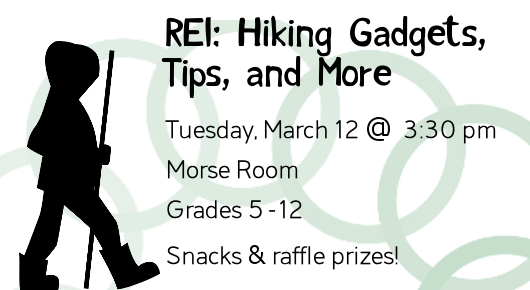
REI Hiking, Gadgets, Tips, and More

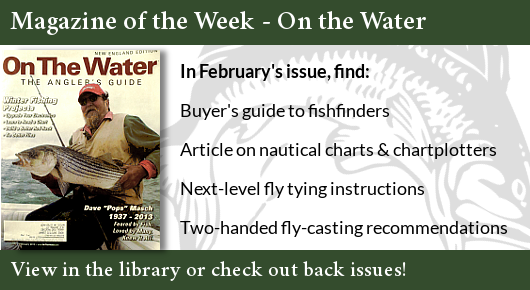
Today’s designs come from Becky Schneider, Reference Librarian & Webmaster at the Morse Institute Library. After adding an image carousel to her library’s website, Becky’s been brushing up on her self-taught graphic design skills.

Magazine of the Week AdvertisementHere’s Becky’s view on her design work:

I try to keep my designs minimal but still varied in look and feel. I work in GIMP[the GNU Image Manipulation Program]. My graphics and fonts are from the Open ClipArt Library and Open Font Library. I’ve learned so many good tips from The Non-Designer’s Design & Type Books by Robin Williams (not that Robin Williams).

I’m curious about how other small to medium-sized libraries divvy up design and publicity-related duties. I do graphic design for the web, staff do flyers for their own programs and displays, and our outreach person writes for external media. Signage, other than our primary locational signage, is a bit miscellaneous. If anyone wants to share their own experiences with managing publicity and design in the comments, I’d be interested.

How do you manage design and publicity in your own libraries?

For the original GIMP files of these slides, email Becky Schneider.

Your Designs, Here

Although we love the feedback you give on our own designs, we’re hoping to feature more non-april-and-veronica library creativity. We’re so grateful to the librarians who have submitted their work to us here at Librarian Design Share, and we’re eager to display new designs as well.

If you’ve created a brochure, handout, display, web design, or some other visual material for your library that you’re particularly proud of, consider showing it off here. Or if you have a work-in-progress that needs some feedback from other librarians, send it our way.

Our colleagues in Libraryland are some of the most creative people we’ve ever met, and we want to share that creativity here.


Create a free website or blog at WordPress.com.

Up ↑