Search

Librarian Design Share

inspiration for library creatives

DIY or Prefab it?

It’s a question we’ve all asked ourselves at one point or another. We might be under a tight deadline to create a presentation for a class or a series or brochures for an event. We weigh out our time constraints against the creativity raging inside our brains, our proficiency with design tools, and our desire to work on a particular design piece. Then we come back to our question: Do I DIY it or Prefab it?

At Librarian Design Share, April and I have made it a point to share original designs created by library-related folks for library-related purposes. Your designs are AH-MAZING (and of course we want to encourage you to keep ’em coming). We would of course, be remiss if we didn’t acknowledge the role that prefab designs play in our work. In fact, one could argue that, since all designs on Librarian Design Share are available for adaptation and resuse, this blog is in fact a sort of prefab design site.

If you aren’t familiar with traditional prefab design sites, just think of Microsoft Publisher or PowerPoint Templates on steroids. Some of the more popular flyer and infographic creation sites out there are ones like:

They offer a variety of attractive templates that can be customized to varying degrees to meet your design needs. Many retain some kind of a branding presence on the end result (a logo, a link to their homepage, etc.), but it’s a small price to pay for a good-looking end result. Some of these sites allow for much more customization than others. Piktochart is definitely on the more customizable end of the spectrum.

Take for example, Sarah Visintini, System Administrator at the Social Media Lab at Dalhousie Unviersity in Halifax, Nova Scotia, who used Piktochart to it’s most creative effect. Here are two infographic presentations she created using a blank Piktochart template and all of the many elements available through this site:


social media in health

Social Media in Health Care: How social media can help you better connect to your patients and to your community.

Using and infographic to present is a visually engaging way to relay information that takes you outside of the normal PowerPoint / Prezi mold.

So when do you use prefab sites? Or do you always DIY?

Video Slidedeck Theme

Earlier this month I presented at the Brick & Click Academic Libraries Symposium on a student-led library video project I started at St. Mary’s. This post is not about that project. But it is about slidedecks and how, when given the opportunity to make things easy, I make things more difficult for myself. BECAUSE THAT’S THE KIND OF GAL I AM.

I wanted a fun video-related theme running through my presentation slides and decided to upcycle a poster I had originally created to publicize our library’s new Films on Demand subscription. I changed around some fonts (using Arvo and Sofia Pro Light), added some movie-related icons and other graphic elements through-out and BLAM-O, a new template was born. It was really more of a time-consuming why-did-I-decide-to-do-this creation rather than a spontaneous design, but I’m happy with the final project and hoping that by sharing it I can save some people some time.

I’ll end with a brief exchange I had with my husband about this slidedeck:

ME: Check out my presentation slides!!!!!
HIM: Cool. I didn’t know Powerpoint had that theme.
ME: It doesn’t. I made my own theme.
HIM: Of course you did. *head pat*

You can check out the embedded slidedeck through Slideshare, or email me, Veronica, for the original PP slides and Photoshop layout.


Making Your Library Promotion Pop

We’re all working to make our designs pop as librarians, but it’s probably rare that we actually sit back to consider the principles behind the designs we are making. However, just a couple of months ago, I was asked by the Medical Library Association to present on this topic.  So, I am posting the presentation as both a review of basic design and also as an inspiration for design, because it was (by far) the hardest part of making this presentation!

When you make a PowerPoint presentation about design, you want it, uh, designed well. I’m tired of the themes that PowerPoint has to offer, so I usually design my own when I can. While I didn’t come up with the title for this presentation, I did want to play off of it. “Making your Library Promotion Pop” conjures up many themes–popcorn, pop art, popsicles…  I tried them all unsuccessfully, until I came across an unlikely inspiration saved on an older flashdrive: a New Year’s Eve party invitation that I admired some time back and planned to recreate for my own use.  The fireworks and the colors are modern, graphic, and exciting and the elements of the invitation just kind of created the theme for me.
Picture1
You never know where inspiration will strike…or pop!
If you are interested in the original PowerPoint file, contact me.

When Bad Things Happen

There aren’t many things more tragic in a library than a flood.  When our ceiling gave way last week to a giant black waterfall over our bound journals and public area, we could hardly believe our eyes.  We’re still assessing the damage, but in the meantime, we have plastic sheeting hiding more than half of the library, loud noises, and confused patrons.  It was time to present a unified message to ease the communication about what happened.

I wanted to keep the feeling of these signs in tune with our overall aesthetic and color scheme, and I wanted every person who enters the library to see them.  I used the water droplet for the obvious reason that it graphically represents the gallons of water that flooded us, but I can also see it as a tear, and there were certainly a few of those as we sloshed through the mess last week.

I placed these half-sheet signs on all of the tables we have available.  The message is light, helpful, and thankful.

flood2

On the front desk, I placed this larger sign to explain things a little more in details and to help our staff with the right words to say to patrons.

flood1

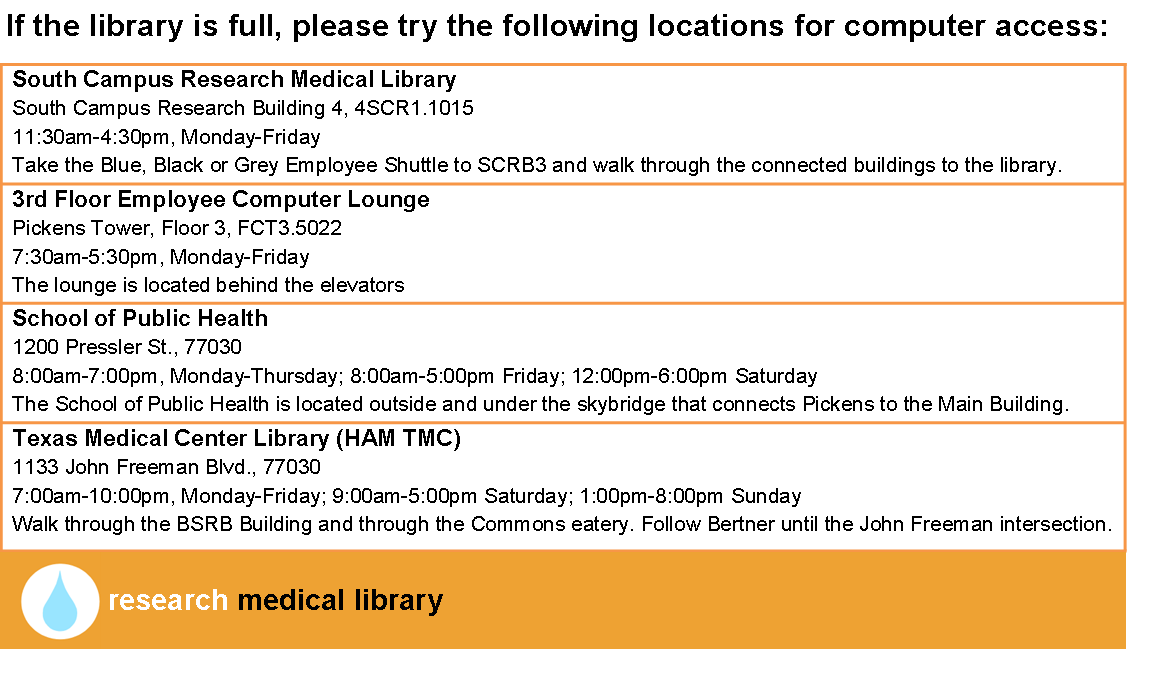
Finally, we are because we quickly realized that our limited space is not enough to fill the needs of our patrons (a nice problem because it illustrates our usefulness),  I created this quick half-page handout to point out other computer areas nearby:

flood3

Of course this design doesn’t do much to make us feel better about what is happening in our library, but it does serve an important role, and does it better than a hastily printed sign might.

I hope you don’t ever have a need for these signs, but if you do, email me for the original files.

Advertising Ebooks

My library is currently taking part in a demand-driven acquisition ebook pilot project through Proquest’s EBL and our state college and university library consortia. The challenge: advertise that mouthful to our students, faculty and staff. The solution: A mix of attention getting posters, slides for our website image carousel, as well as pamphlets and an accompanying libguide that go into more detail about the program and give our users instructions on how to access and download these ebooks.

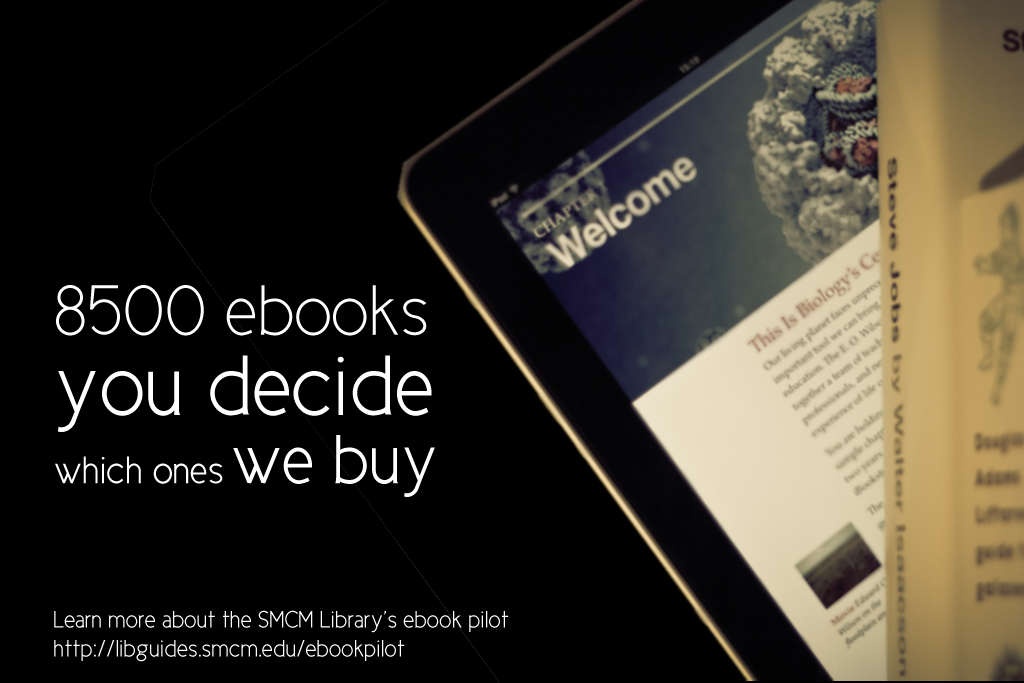
ebook dda pilot poster advertisement

After struggling to coming up with an interesting, non-cheesy way to visually represent ebooks, I found the photo above on Flicker, and thanks to its creator Johan Larsson’s generous CC 2.0 Attribution license, I was able to build a design around it. I cut out most of the background, layered it on a black background and used Cicle font to create a slogan that is (I hope) intriguing but still meaningful. I decided against including a QR code because previous efforts at including them in signs for my library showed that none of the students were using them. The posters will be placed on bulletin boards in various academic buildings around campus.

I then adapted the poster design to a smaller scale: our website’s image carousel:

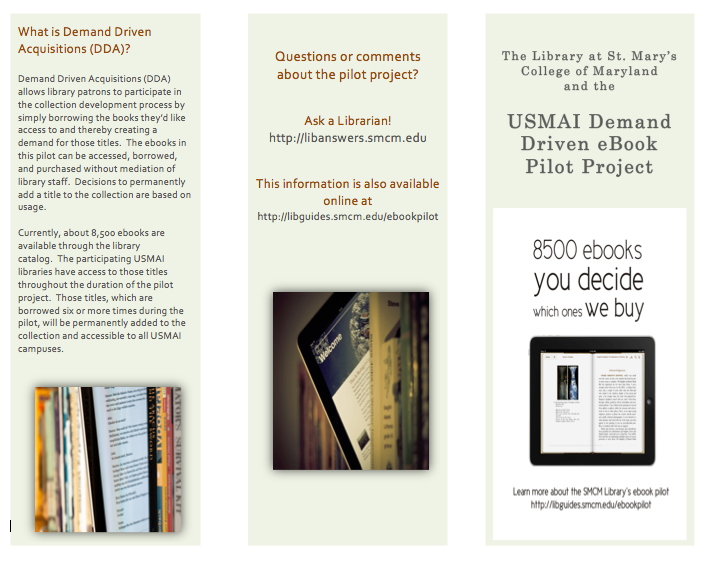
ebook pilot image carousel slideThis slide links out to a libguide about the ebook pilot project. Created by my colleague, Alana Verminski, the libguide offers more detail about the program and gives detailed instructions for users to locate, access, and download or print portions of the ebooks. Alana also did a fantastic job of creating a tri-fold brochure about the ebook pilot project which we’re sharing at our library’s information desk for those who want to take away information about it.

Ebook Brochure Inside Ebook Brochure OutsideThe poster and image carousel slide were created using Photoshop and the tri-fold brochure was created using Word. For the original files of any of these designs, please email Veronica Arellano Douglas.

Remixing Old Designs

Last December I shared a sign I created for our reference desk advertising our library’s chat reference service and LibAnswers Knowledgebase. I love it when designs on our site get remixed and re-purposed. Erica DeFrain of Honey-Badger-Boolean fame switched up the sign’s layout, “fussed with the text,” and of course, changed colors to match her home institution. The result is below:

Ask us sign for the U of VTAwesome, Erica! If you’ve adapted any of the designs on our blog, let us know! We’d love to feature them here.

Tackling Ugly, One Food-and-Drink Policy Sign at a Time

If your library is anything like every library I’ve ever worked in or visited, you have at least one hastily created 8.5″ x 11″ flyer meant to disseminate some bit of library policy or rule. More often than not there are collection of these flyers in mis-matched fonts and color schemes across the library, devoid of any branding or cohesive theme, and let’s be honest, just plain UGLY. My library has ’em. Your library has ’em. We all have at least one example of a sign we pass on a daily basis that just makes us cringe.

Melinda Roberts, Business Librarian at the Lippincott Library of the Wharton School at the University of Pennsylvania is tackling ugly in her library, one sign at a time. Her first target was this ancient Food & Drink Policy Sign:Old Food and Drink Policy Sign

Not good. Here’s Melinda’s take on things:

I’ve become the unofficial designer here at my library.  I’ve had no official design training other than attending workshops on several Adobe products. I’ve been trying to update some of our outdated signage around the library. One of the signs we’ve had for a long time is the Food & Drink Policy. The old sign is so full of text that I am sure no one is reading it! I designed a new one that is more visual.

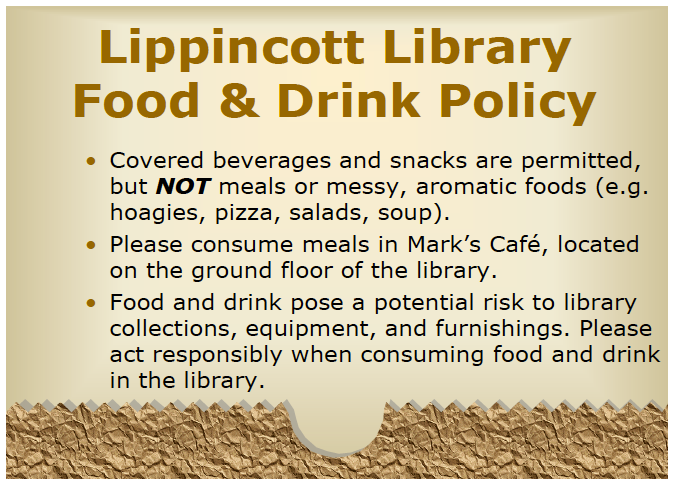
New Food & Drink Policy Sign

We have small plastic sign holders that are 5×7, so I made my sign so that it can be printed, then folded in half. I try to save prep time in the design.

2-sided new food and drink policy design

For the original Adobe Illustrator file of this design, please email Melinda Roberts.


Know Your Meme AND Boolean, too

Boolean Logic, honey badger styleInstruction librarians are no strangers to explaining Boolean operators. The trick is to never mention the words “Boolean operators” to students, lest their eyes begin to glaze over and drool begin trickling from the corners of their slightly open jaws. So we try everything we can to make it entertaining, from sit down/stand up exercises (e.g. “everyone wearing blue jeans AND glasses stay standing”) to amazingly hilarious images like the one above, created by Erica DeFrain from the Bailey/Howe Library at the University of Vermont.

I’m actually married to a graphic designer…but I think (I hope) the ugliness contributes to the humor of the whole thing. Talking about Boolean search logic can be a little challenging, especially in late-afternoon classes. I wanted to give a nod to a cultural phenomenon while also perhaps getting a laugh from those in the audience who know and love the infamous honey badger.

For the layered Pixlr file, email Erica DeFrain.

Grab Some Popcorn

We recently moved our entire DVD collection out to the open stacks in our library. They used to be behind the circulation desk, and anyone who wanted to check out a movie had to look up a title and request it or browse through pages and pages of our DVD listings in a printed binder.

To celebrate our new browsable DVD collection, we toyed around with featuring librarian and library staff movie recommendations on the tops of the shelves and via social media. I came up with the posters below. They’re my less creative, i-can’t-use-illustrator-so-photoshop-will-suffice versions of these minimalist children’s book covers and re-imagined movie posters. I also threw in an advertisement for our library’s new Films on Demand Subscription, to go along with our movie emphasis.

Citizen KaneFilms on Demand Poster

I didn’t get a chance to brand the posters for our library, and ultimately, our library decided to go in a different direction with the publicity efforts. Even though these posters didn’t get used I thought they were still worth sharing in the event that someone else might use them or be inspired to great better versions!

Muriel's WeddingEternal Sunshine of the Spotless Mind

If you’re interested in the Photoshop files of these posters, email Veronica Arellano Douglas.

Create a free website or blog at WordPress.com.

Up ↑