Search

Librarian Design Share

inspiration for library creatives

Visualizing Research is Hard

I’ve been working on a poster for my institution’s ACRL Assessment in Action project for the past month or so and it’s easily been one one of the toughest things I’ve had to design EVER. With ALA and other summer conferences around the corner, I’m willing to bet there are plenty of librarians and library students in epic-poster-design-battle-mode at the moment. So let’s talk posters, research and pictures.

To sum up our AiA Project: The St. Mary’s College of Maryland team was interested in learning if faculty-librarian collaboration had an impact on students’ information literacy (IL) skill development in the First Year Seminar (FYS: a required course for all first year students). It was a multi-method assessment: student surveys, faculty surveys, librarian surveys, rubric-based assessment of student essays and faculty interviews. This made coming up with a poster design particularly challenging since there was simply SO MUCH INFORMATION to share.

After hearing from an AiA cohort member who was taking a really simple, conversational approach to designing her project poster, I knew that I wanted to try to replicate that approach as much as possible. There is only so much information you can take in from a poster, and I would much rather be talking to people about different aspects of my project than having them squinting at the text above my shoulder.

AiA-Poster-Draft-small

I still think the poster is kind of busy, but to be honest, I’m so tired of it right now that I’m willing to let it go through the AiA peer review process and worry about it next week. It still needs alignment adjustments, and I’m not totally sold on the white font on the blue background, but it’s something!

Here are the pieces I like best:

Methods: All of our assessment pieces were part of a greater whole, and took place at various points throughout the semester. I was inspired by other AiA colleagues who took a timeline approach to their methods section and thought this was a nice compromise.

methods

Research Question & Background: This was originally a long paragraph with background information about our First Year Seminar, our IL outcomes, and our assessment project. I decided that if someone really wanted the long story, they could visit our project website (which I’m in the process of developing) or just ask me more about it. I paired down the research description to the just the essential question and basic facts about the FYS and our involvement with it.

question

Results: This is just a portion of the results section, which was easily the most difficult section to develop. I’m still not totally pleased with it, but I wanted to try something other than bullet points and graphs. I don’t know if I did the right thing leaving out numbers and I may go back and change that, but again, I think if people want the finer details I can refer them to the project website with averages, t-test scores and correlation scores, right (I hope)?

results

What kind of posters are you working on for conferences this summer? What’s your approach to visualizing your research?


Let Us Know

Assessment isn’t easy, and sometimes the hardest part of measuring your effectiveness is getting patrons to take a survey.  When our library embarked on the LibQual survey last month, we had a goal to reach more patrons that we had in 2010.  We agreed that a marketing campaign was the best way to accomplish this, and that our catch-phrase would be “Let Us Know,” which is simple, but exactly what we wanted patrons to do.  So I got busy making designs to promote our LibQual.

Whenever I start to create something, I look for other examples out there for inspiration.  I found these amazing designs from a French library (and then of course I had to Google translate to understand the text!):

Affiche2Libqal+40X60cm

Affiche3Libqal+40X60cm

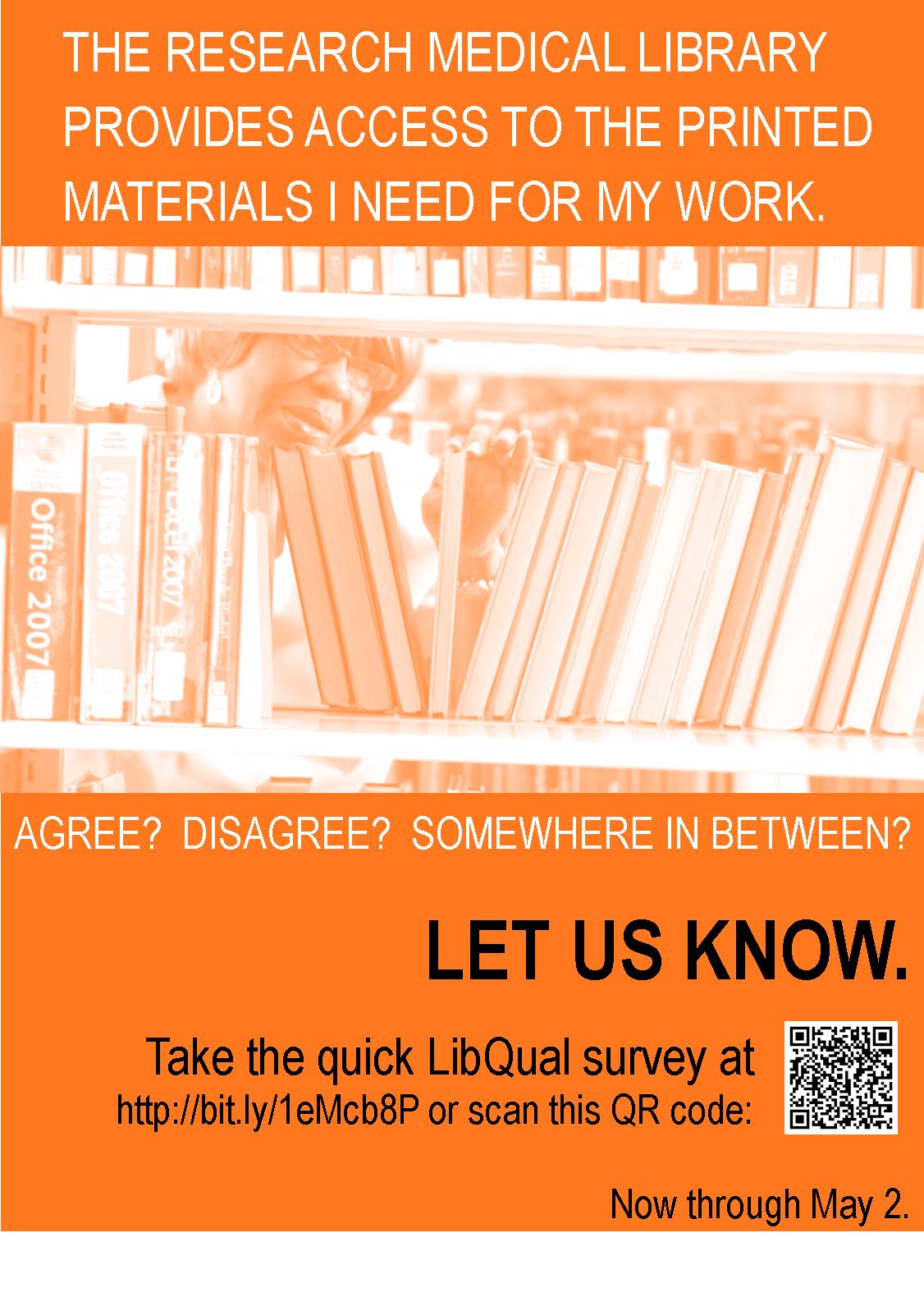
These marketing signs were unlike any others I had seen, and I knew I wanted to create something similar for our library.  In the designs above, you are asked if you prefer your library one way or another…I didn’t have a lot of staff to stage pictures, so I used the pictures we already have.  My designs don’t compare services, but each one does ask a question straight from the LibQual survey.

libq1

libq2

I placed eight different variations of this design around the library to catch patrons’ eyes, but to remain consistent in design and message.  I furthered our library “brand” by using orange, the color we use on our handouts, website, and instructional materials.  Our patrons are pretty used to seeing “library orange” these days.  To continue the message, we used the phrase, “Let Us Know” with an orange picture in emails to faculty, staff, and students, and we placed this banner on our website:

news_banner10

So how did it go?  Well, we increased our respondent rate by 25% from years past.  We can’t directly count the marketing for the increase, but I’d say it didn’t hurt.

What are you doing to promote your library?  Have you tried to market your LibQual survey?  Share your designs here with us!  And, if you would like the original Publisher documents to modify for your library, contact me.

Read the Rainbow

Read the Rainbow: Literacy in Pantone SwatchesWe’ve featured a few different book displays on Librarian Design Share since our blog began, and I have to admit they’re my secret favorite thing to post. I don’t really get the opportunity to create displays for my library, so I think posting other people’s displays is my way of filling a personal design void.

This fantastic display comes to us from Leanne Mobley, MLS Candidate at Indiana University and the Center Supervisor at the Willkie Library, Indiana University Residential Programs & Services Libraries.

Read the Rainbow: Literacy in Pantone SwatchesHere’s Leanne in her own words:

For the month of April, I put together a “Read the Rainbow” display to highlight our fiction collection. The display is an homage to the classic Pantone paint swatches. I rounded up a handful of books with vibrant covers and then used the eyedropper tool in Illustrator to select the main color featured.

I also ransacked the paint swatches at our local hardware store and covered our bulletin board. We mostly circulate DVDs and music, but our patrons are really enjoying the display and seem to be taking notice of our fiction collection.

Read the Rainbow: Literacy in Pantone Swatches

April and I both love classic look of Pantone color swatches and can easily see this display replicated in academic, school, and public libraries. Really any library with a fiction collection would be able to do this!

If you have questions about the display, leave a comment. For the Illustrator files that accompany this display, contact Leanne directly.

A Breath of Fresh Air

We recently had some changes in our library, which precipitated a change in the General Info sheet that we have on our desk.  Originally, I was just going to update the information, but it seemed like a good time to mix up the design too, as we haven’t in over two years.

Here’s the old design, heavy with institutional colors, a traditional image, and lots of text:

3-4-2014 8-29-09 AM

And here’s the newer version with lots of white space and an image of our library that better represents our focus here (i.e., not solely books or even the physical world):

Picture1

So, yes, most of the text is still present, but I feel like it has more room to “breathe” with more white space.  I’ve retained our brand and color scheme, but simplified the design, and I’m a lot happier with the look.

Do you periodically update the look of publications in your library?  If you’ve done any of this lately, we’d love to see some before and afters!

If you are interested in the MS Publisher version of this design, contact April.

Color Palettes From Your Favorite Images

At the ALA Midwinter ACRL Marketing Discussion Group, a librarian shared a great little online color palette generator with me, and I, in turn, am sharing it with everyone else.

The DeGraeve Color Palette Generator will create two color palettes based on a photo URL, one vibrant, one dull. Take a look at it in action:

degraeve color palette generator

It’s a great tool to use whenever you’re building a flyer, poster, or web design around an image.

Flood of Information

Sometimes when bad things happen, you brush them under the rug and pretend they never happened. Other times, you have to address them, embrace them, and then celebrate them. I’m so happy that our library did the latter after our leak last year. We were lucky to have the institution’s full support to repair our space. Once we did that, we decided to throw a party to recognize those who helped us and to welcome back our patrons.

rmlcelebrate

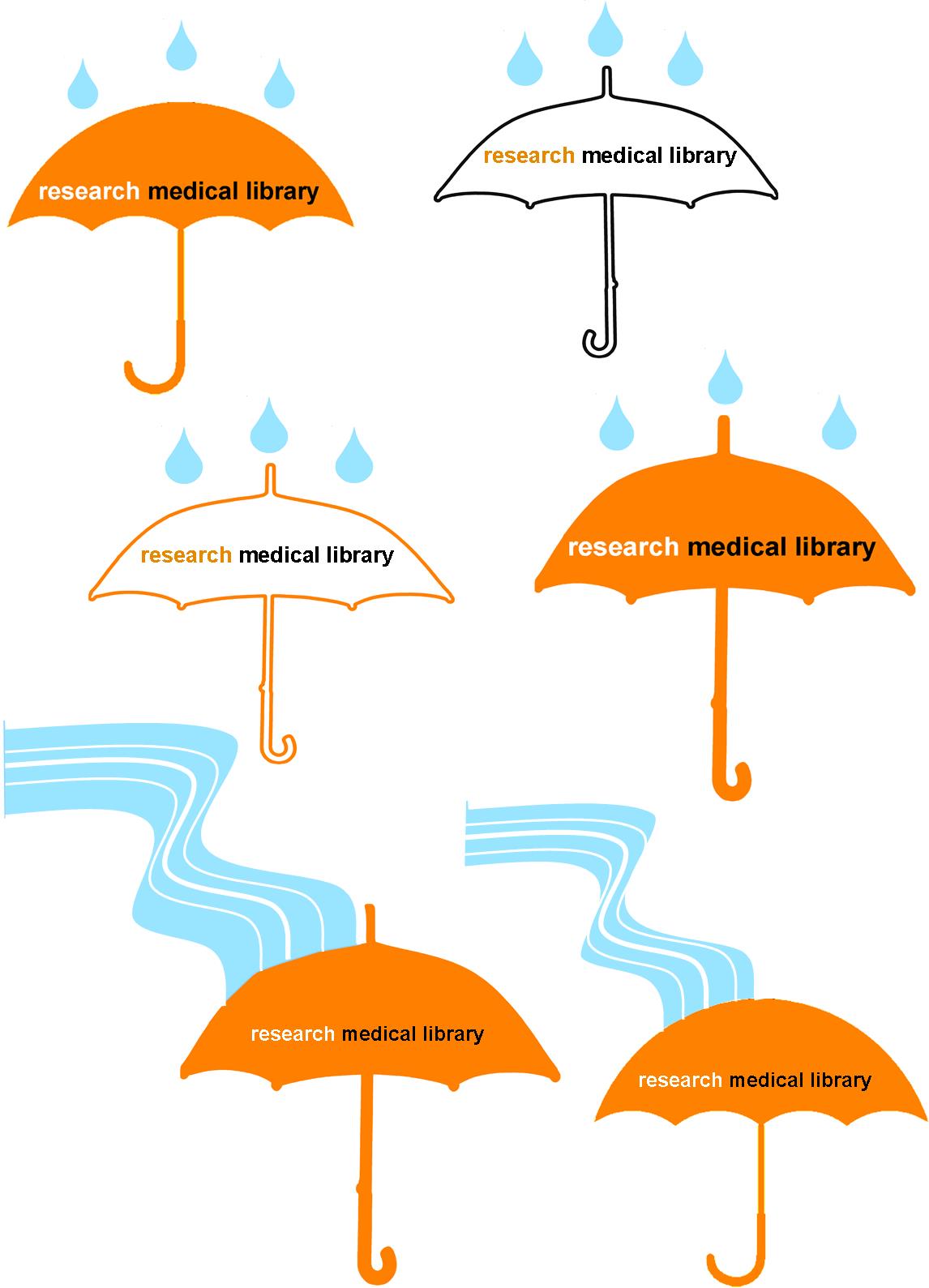
When designing the invitations (above) for our celebration, our library felt that it was important to keep the theme very similar to that of the leak communications. As a group, we brainstormed ideas that would go with the droplet, and we came up with the idea of using an umbrella. It’s a protection device, and that’s what our role was during the leak–protecting both our collection and our patrons from harm. I presented the following designs to the library to vote on:

umbrellas

I used clipart umbrellas from Microsoft Word, filling some with colors and changing the outline colors.  I combined the umbrella image with multiple clipart rain droplets that I previously used.  This design was OK, but it felt like the library had endured more of a flood than just a few drops of water…so I used the curvy line drawing feature in Publisher to insert a “flood” that runs to the umbrella.  Our staff overwhelmingly voted for the flood rather than the drops, and they liked the simpler umbrella best, so we had an icon for our party invitation and publicity efforts.

This design opened a floodgate of ideas (sorry for the pun, but get ready for a lot more to come!).  We decided our party would include a self-guided “Flood of Information” tour, which would highlight the different spots in the library that were affected, as well as connect those spots to a fact about our services.  Each station, named after songs that we thought exemplified the experience, was an exhibit: we had a tape line that showed how far the water flooded; we displayed damaged books; we had pictures and videos from the leak; and we showed a video about disaster recovery.  The five stations were easily found with a map that was coordinated to blue paper droplets taped to the floor.  Below is the two-sided map we distributed to our guests (and I won’t even go into the boring details of making the map, although it probably took longer than any other part of the design!).

floodofinfotour

To make our party even more personalized, after the tour, we invited guests to enjoy homemade cookies that all of us on staff had baked.  It was a warm welcome back for our patrons and a real celebration of our successful recovery.

If you are interested in any of the designs above to modify for your own recovery or celebration, let me know.

Good Design Doesn’t Happen Alone


On Saturday I gave a short talk at the ACRL Marketing Discussion Forum at ALA Midwinter. The whole presentation, as you can tell from the title slide, was about using the people and communities around you to help you create better, more engaging visual materials for library marketing and outreach efforts. It may have been cold enough in Philly to make me wish I was in Texas in July, but the conversation at our discussion was lively and warm! I had a blast. Big thanks to Katy Kelly and Jessica Hagman for inviting me to participate, and I hope y’all enjoy the slides.

This presentation was created using Photoshop. Images were saved as PNG files and layered onto a Google Slideshow. For any of the original Photoshop files, email me, Veronica.

Library Therapy

Miyo Davis at St. Francis College Library wanted to host a Library Study Break for students during finals, but didn’t have the budget for a huge event.  Inspired by this post on Librarian Design Share and an idea she got from a talk at an ACRL conference about librarians as research therapists who are available to assist with issues patrons have while researching, Miyo demonstrates that chocolate is always the best medicine.
Miyo describes her design process below: 
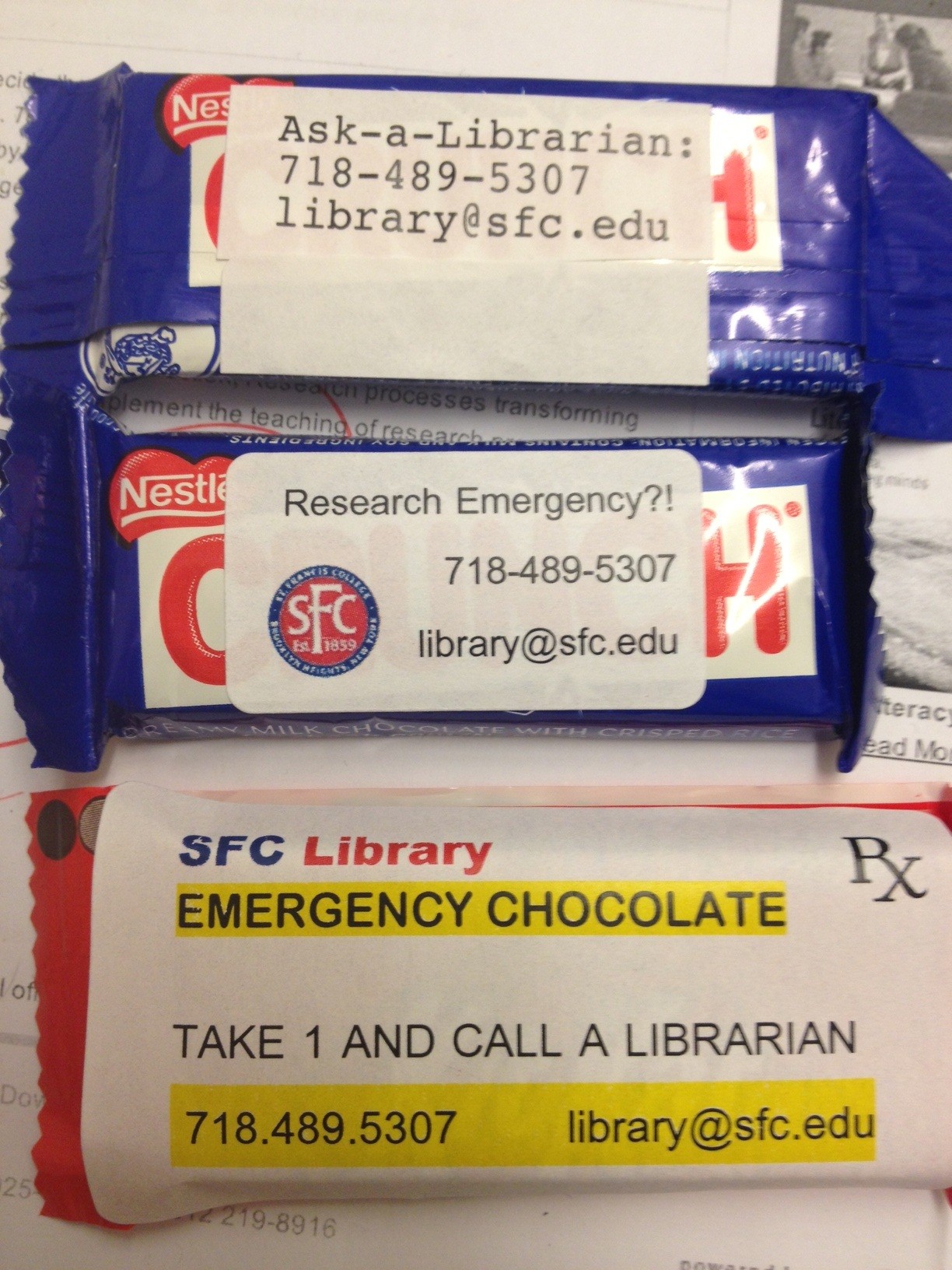
We have a ton of leftover Demco® Processing Circulation Label Sets 1-5/8″ x 2-9/10 (SLB spine labels) so my first prototype was a result of just typing up our contact information into the OCLC Label Program.  It was an effective way of getting out our contact info but didn’t really have any personality.  I then downloaded a Microsoft Word template from DEMCO’s website.  Working in Microsoft Word gave me a lot more flexibility with font size, style, color and allowed me to add pictures. For my second prototype I experimented with incorporating our school logo.  This looked nice, but again, I felt like I could take the design a step further.
prototypes
 
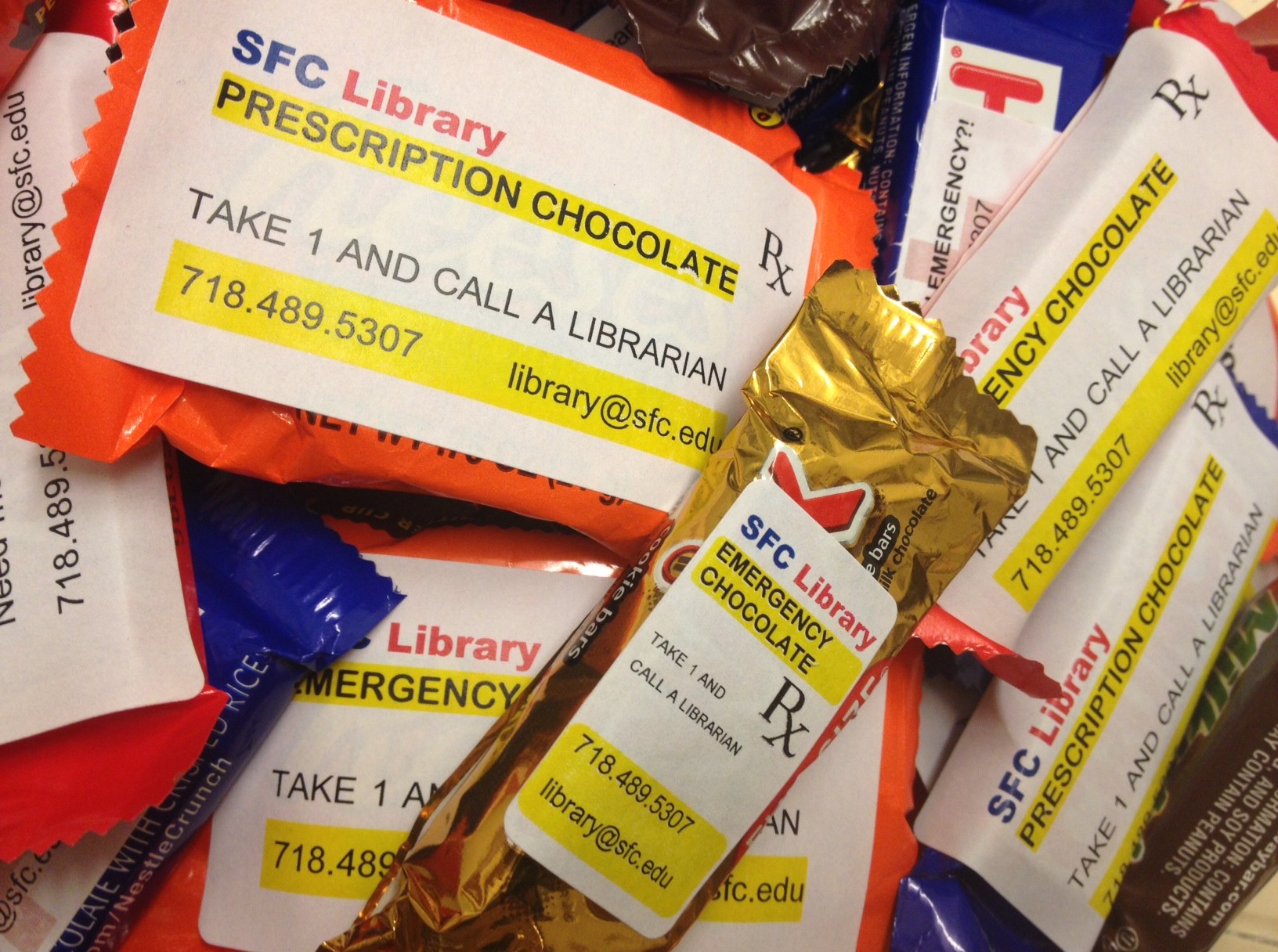
Going with this theme [library therapy], I thought it would be funny if the labels on the candy looked like the labels on prescription bottles.  With a little personalization, I turned the library into a pharmacy and the chocolate became “Prescription Chocolate” and “Emergency Chocolate.”  They were a big hit and the students appreciated the joke.
Prescription
These are fun and very timely.  If you are interested in the original Word file to create your own library therapy chocolate, contact Miyo.

Changing it Up a Little

April and I started this blog last December, and since then, we’ve been so impressed with the designs you’ve shared with us. In an effort to better showcase new designs and mix things up a bit, we’ve given Librarian Design Share a little face lift.

New year, new theme, new layout.

You can still search the blog for design inspiration, and all of our category, tag, and archive information are available in the site footer.

Hope y’all enjoy the changes around here.

Create a free website or blog at WordPress.com.

Up ↑