Search

Librarian Design Share

inspiration for library creatives

Tag

canva

Final Finals Post for the Semester

It seems like this year, more than ever, librarians have truly responded to students’ needs during finals with extended hours, programming, and tips and tricks to survive the stress.

Every spring semester at the MGH Institute of Health Professions, the library co-sponsors activities for students to take study breaks. Librarian Amanda Tarbet created the flyer below using Canva to remind students of library events during finals:

Continue reading “Final Finals Post for the Semester”

Library Reports as Infographics

For those of us in school and academic libraries, the end of the semester and school year is a time for reflection and…reporting (womp womp). Rather than send out the same old charts, graphs, and narrative reports, why not turn a chore into an exercise in graphic design? It’s a great opportunity to learn a new graphic design tool like Canva, Publisher, or Illustrator, and may even give you a chance to think about what numbers and data mean the most to you and your library.

Continue reading “Library Reports as Infographics”

A Point-and-Click Guide

Some of my least favorite teaching moments are those focused on mechanics: Click here; scroll there; point at this; type on that space. Jenica Ibarra, Reference & Instruction Librarian at St. Petersburg College-Clearwater Campus uses Canva to get around the mechanical aspects of library instruction to focus on more substantive teaching:

Continue reading “A Point-and-Click Guide”

Our Love Affair with Canva Continues…

Hello 2016

Happy New Year, everyone! 2015 has been a year of transition for April and I here at Librarian Design Share. Our jobs and responsibilities may have changed a bit in the last year, but our love of design continues, and so does Librarian Design Share. We can’t wait to see what amazing posters, displays, web designs, and other visually stunning materials you’ve been creating for your library! Over the next few months we’ll have new posts, new resources and recommendations, and a few surprises, too. We can’t wait to see where this new year takes us, and hope that your own journey is a happy one.

–Veronica

Featured image created by me, using Canva and my husband’s Lego photography (because he’s generous like that). 

Just the Highlights

Library informational handouts and brochures–the kind we give away at orientations, fairs, and workshops–can easily suffer from the classic librarian pitfall: TOO MUCH INFORMATION. Striking the right balance between needed information and visual interest is a challenge. Lindsay Davis, librarian at the Los Banos Campus Library at Merced College has created informational flyers for students and faculty that touch on all the library “highlights,” those crucial services and bits of information that will make the most impact with library users.

Continue reading “Just the Highlights”

What Can You Do With Canva?

We’ve seen an increase in the number of submissions we’ve received from folks using Canva, so we decided to devote a whole post to this web-based graphic design tool.

Earlier this week we featured library hours signage from Edita Sicken, Instruction and Access Services Librarian at Manchester University’s Funderburg Library, which she created using Canva. Edita’s also used Canva to create all kinds of library flyers and advertisements, like the ones below.

Chat Graphic

Edita sang Canva’s praises in our last post, but here’s a recap of what she loves about Canva:

  • templates
  • fonts
  • graphics
  • availability of a mobile version for design on the go

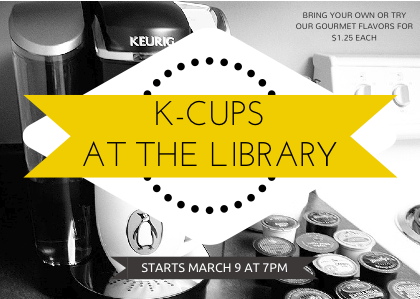
K-Cups at the Library

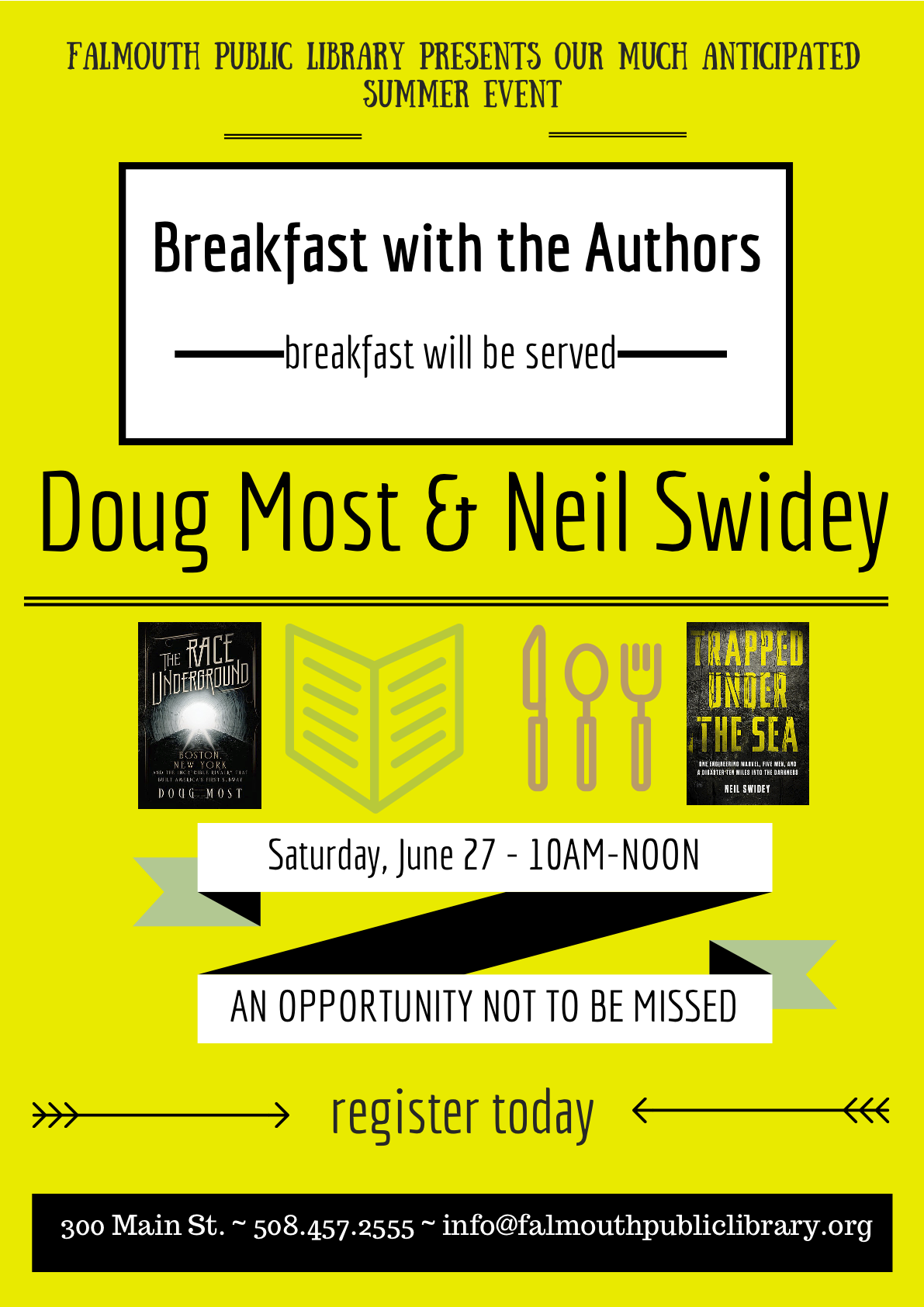
Kasia Piasecka, Reference Librarian at Falmouth Public Library, has used Canva to create fantastic advertisements for library events and programs, like the one below.

Breakfast with the authors

Here’s what Kasia has to say about using Canva for graphic design:

As a past self-professed Microsoft Publisher geek, I was really excited to start using a new (free!) web-based program to design publicity materials and advertisements for our library. I see my role as a librarian and as a designer as complimentary — by strengthening my ability to design beautiful materials, I am promoting the library as the incredible community center that it is. Although marketing the library is a challenge in many communities, I strongly believe that design matters [to your audience], and it makes a difference. It’s very important to market your library, your programs and resources; to carefully design your publicity materials with an eye for detail and a strategy for branding; to identify and choose the best software available to you. As librarians, we are hard-wired to find the best tool to help us, and I cannot recommend Canva strongly enough. I have been absolutely amazed by the variety of designs, presentation layouts, font choices, and overall, Canva’s user-friendly interface.

Long Haul Book Discussion

You can find Kasia on Canva and see all of her designs there, or you can contact her for more details about her marketing materials.

Advertising Hours

For those of us in academic libraries, it’s that time of year again: Finals Week (or impending Finals Doom, depending on who you ask). All of our laptops are checked out, extension cords line the walkways, and students begin appearing more and more disheveled as the week progresses. Our patrons are less interested in research help (all those papers were due last week!) and more interested in the amount of coffee needed to power through an all-night study session.

One thing that often changes during this time of year are our hours of operation. Extended hours during finals week, fewer open hours immediately afterward–all of these changes require eye-catching, easy-to-scan signage. Here are a few great signage submissions advertising library hours.

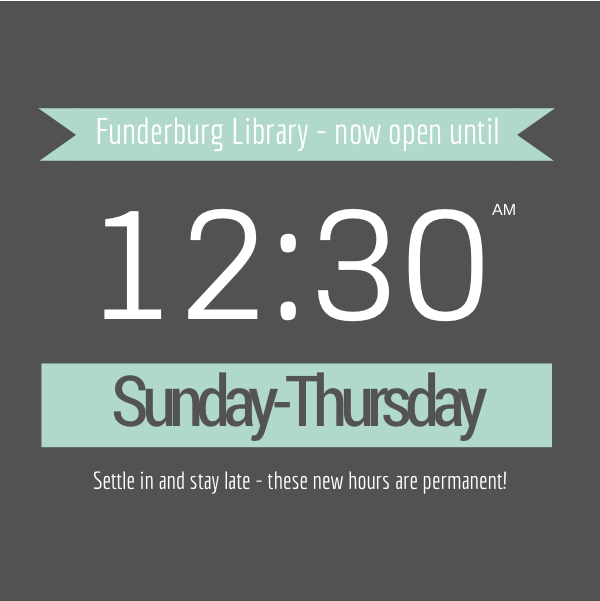
Edita Sicken, Instruction and Access Services Librarian at Manchester University’s Funderburg Library, used Canva to create the her library’s changing hours signage.

Extended Hours Signage

Here’s what Edita had to say about her hours signage:

I used Canva for all of these and none of them utilize any of their pay-per-use graphics. Some of the images used were our own, most of them are under creative commons licenses. I’m well-versed in Photoshop, Illustrator, and Publisher but Canva is really handy to use because of all the templates, filters, fonts, and graphic elements that are readily available. Plus there’s a mobile version available so if I’m out at a conference with my iPad and realize I forgot to get a promo image out, I can throw one together really quick!

Fall Break Hours Signage Spring Break Hours Signage

Sometimes our library’s operating schedule can get a bit complicated, which means our signage often suffers from too much information all at once.

Jonas Lamb, Public Services Librarian at the University of Alaska-Southeast’s Egan Library, recently revamped his library’s hours signage using Photoshop. Here’s the old version, which, as Jonas mentions, “often got over complicated with intersession and holiday exceptions.”

Egan Library Old Signage

You can see that the new versions follow a nice template with variations in color for different times of year. It’s a great way to highlight changes in hours while still maintaining a steady look and feel.

Egan Library Summer Hours
Here’s Jonas’ talking about this new signage:

I’d reached my wit’s end with library signage designed using Word, Publisher, PPT, etc and finally taught myself enough Photoshop to put something visually simple to refresh our existing signage.  Around the same time we began using 4×6 acrylic table top-6 sided sign holders and an 80” digital display so I had an opportunity to re-use elements of the new design into a variety of sizes and layouts, subtracting text elements where appropriate.

Egan Library Spring Hours

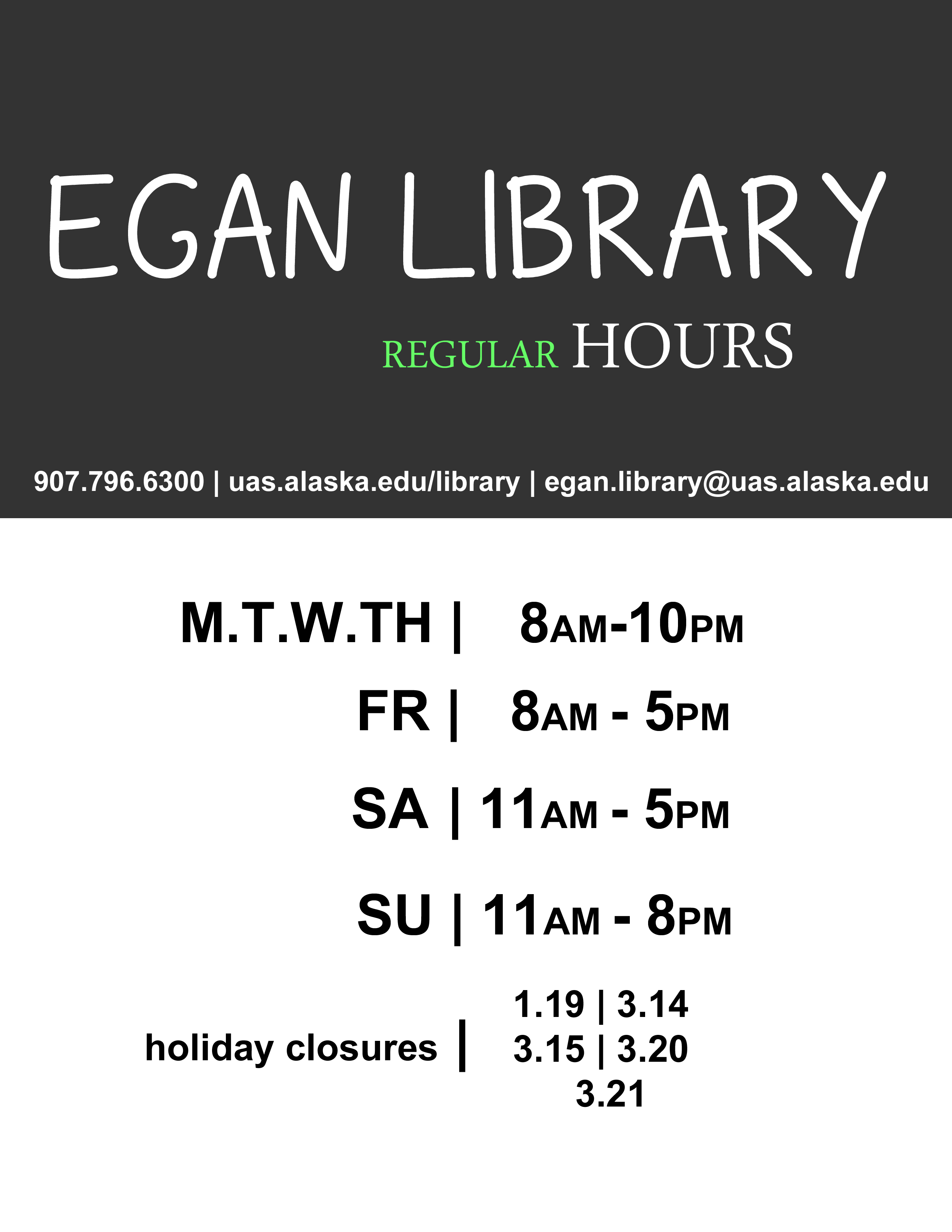
Egan Library Regular Hours

What are your solutions to advertising modified hours of operation? Do you have other signage you’d like to share? Or better yet, signage you want to change but aren’t sure how it can be improved? Let us know!

PDF and JPEG versions of Edita’s Canva signs are available on the Librarian Design Share Google Drive, as are Jonas’ original Photoshop files.  As always, resuse designs responsibly!

Spotted at ACRL: Posters, Part 1

Last week April and I were lucky enough to attend and present a panel at ACRL 2015 in Portland. Creating attractive conference materials is challenging, but there were so many fantastic posters at ACRL that we knew we had to feature them on Librarian Design Share.

This is the first in a series of posts on eye-catching design we spotted at ACRL. We’ve tried to give each of the presenters/designers a chance to share their creative process with you. We hope you enjoy it!

Poster Sessions

One of the most challenging conference presentation mediums is, I think, the research poster. There is so much information to share in such a limited space. You want your poster to be attractive and engaging, but you also want it to tell a story. Finding the right balance between text and images can be difficult. The posters below are ones that caught our eye with their interesting presentation design.


2 Librarians, 2 Universities: Serving International StudentsTitle: 2 Librarians, 2 Universities: Serving International Students
Presenters: Laurie Bridges, Instruction and Emerging Technologies Librarian, Oregon State University, and Jimena Sagas, Foreign Languages & Literature Librarian, Colorado State University

Here’s Laurie discussing their design process:

Our poster was designed using Canva, after I put out a call to the Twitter-verse asking for a “better way” to design posters, and Dani Cook, a librarian at the Claremont Colleges, suggested Canva. The only drawback of Canva was that I could only make the poster a little over 4 feet wide. However, the ability to have the poster in the cloud allowed Jimena and I to work on it and make changes without having to save and email designs back-and-forth, which I loved! And Canva has templates and free clip art, which we used liberally (all of the icons and design elements in the poster came from Canva’s free clip art).

Before becoming a librarian I held a position as the Marketing Coordinator for University Housing and Dining Services at Oregon State University. I supervised a full-time graphic designer and routinely worked with student designers. Although I am not a graphic designer myself, my past experience in marketing greatly informed the design of our poster. For example, because I worked in print media, I know that posters (at least 10 years ago) always had a “call to action” somewhere along the bottom. So, somewhere along the bottom of the poster you should tell your customer what you want them to do next (in our case it was visit our bundle of bitly links). Also, when I worked in print media I learned that people view posters and one-page flyers in a Z pattern – the eye begins in the top left, moves to the right, then diagonally to the left bottom, and finally ends at the bottom right. Therefore, it is best to have your logo, or other identifying information, in the bottom right. And, finally, I knew I wanted bright colors on our poster, to attract attention, and I didn’t want too much information in the poster, because it should act as a “teaser,” prompting people to either act on our “call to action” or talk to Jimena and I at the poster.
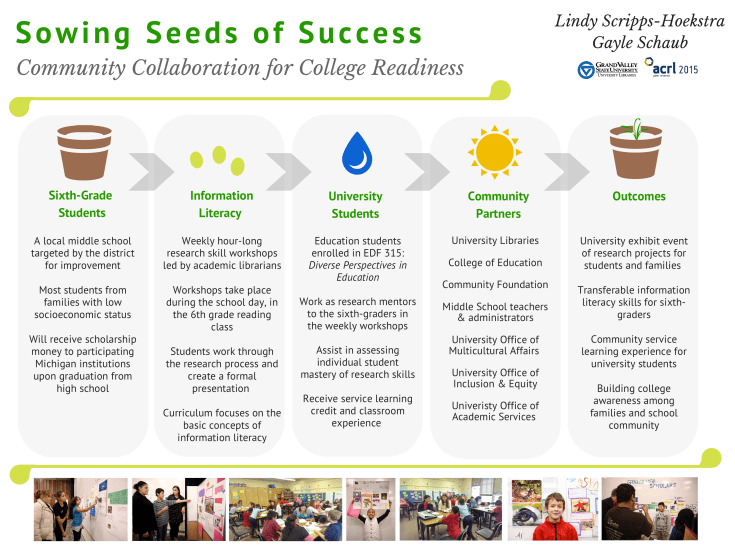
Sowing Seeds of Success - Community Collaboration for College ReadinessTitle: Sowing Seeds of Success – Community Collaboration for College Readiness
Presenters: Lindy Scripps-Hoekstra, Area Studies & Religious Studies Librarian & Gayle Schaub, Liberal Arts Librarian, Grand Valley State University

Lindy discusses their design process a bit:

We used Canva to create our poster. It is really user-friendly and intuitive. They have some really nice fonts and allow users to upload their own images. Anyone interested in making a poster can use the custom sizing to create large-scale prints.  I’ve also used this website to create fliers for my faculty and signage with librarian profiles.

In terms of poster content, we wanted to continue with the conference theme of sustainability by using a plant growth metaphor and related imagery to help guide the eye through our information. We also wanted to include photos of our students without having this overwhelm or distract from the content so we placed those in a simple row at the bottom.

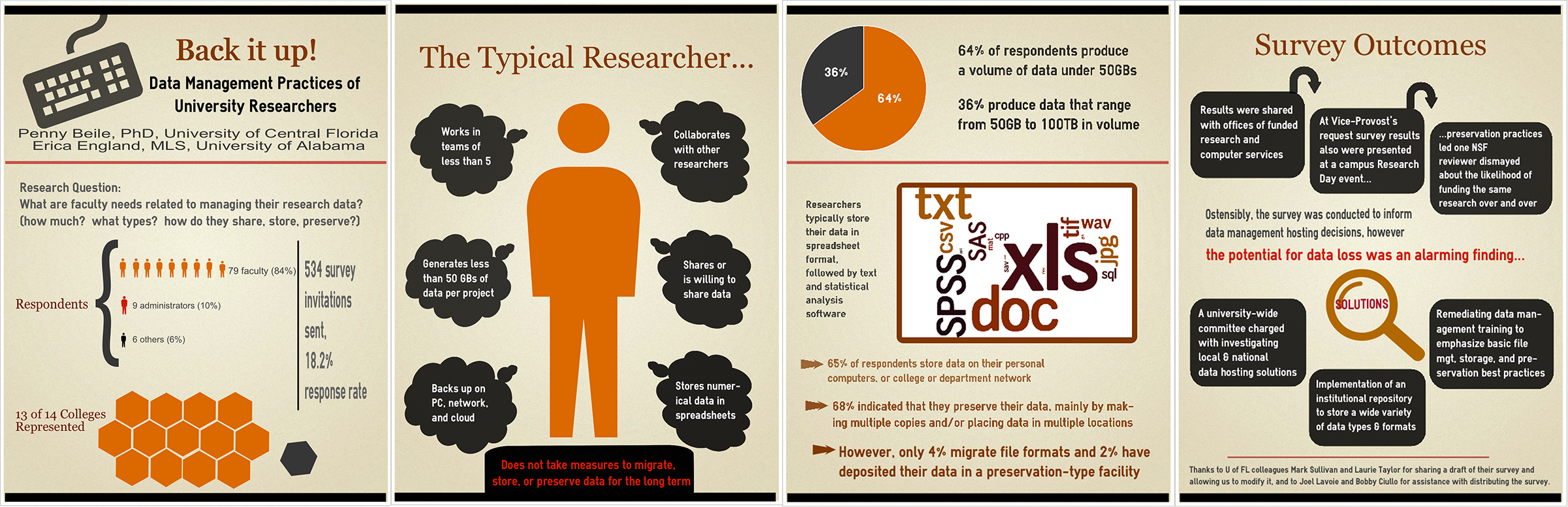
Back it Up! Data Management Practices of University Researchers

Title: Back it Up! Data Management Practices of University Researchers
Presenters: Penny Beile, Associate Director, Information Services and Scholarly Communication, University of Central Florida & Erica England, Adjunct Librarian, University of Central Florida

Here’s Penny talking about this wonderful, 4-panel design:

I usually report poster session research results in a very traditional, text heavy manner – Introduction, Methodology, Results and Discussion, with a couple of charts thrown in.  This time my colleague, Erica England, and I wanted to create an infographic that summarized the information in a visually compelling and simple way.  I often browse infographics sites to get ideas about presenting data and used easel.ly to create the poster.  There are a number of free sites for creating infographics, but easel.ly is the best I’ve found so far.  Erica and I also decided to create four 24”x31” posters instead of a larger 48”x96” poster for ease of transport.  (I only had to take a 24” mailing tube; much easier to carry around than a 48” one!)  After I created an account, I shared login information with Erica, which allowed us to work on the posters from different locations.  We were able to make charts and a wordle, then upload and use those files.  After creating a graphic you can save as a .pdf file, embed in a web site, or share via a link.
Blog at WordPress.com.

Up ↑